Best Way to Collect Photos From a Group (2026)
After a trip, a birthday or any event, the photos are spread over every phone in the group. Everyone took a few, nobody has all of them, and the friends who promised to send theirs later rarely do. The fix is one shared place that everyone can add to from their own phone.
We compared four ways to do that, using each option's official help pages (checked November 2026) and what we see from hosts who collect photos with Lense.

Why the group chat isn't enough
Most groups start with the group chat, AirDrop or a few emails. That works for a handful of photos, but not for a whole group. Photos end up scattered between messages, chat apps often send a smaller copy, and AirDrop only works between Apple devices that are close together. Nobody has an overview of what has been shared, and the people who said "I'll send mine later" usually don't. Each option below solves this by putting everything in one place.
What really matters when you collect photos
Whether you end up with everyone's photos depends less on features and more on how easy it is for the people who took them. These are the criteria we used:
No app, no account: nobody downloads an app or signs up for one evening.
As few steps as possible: scan or tap, then upload. Every extra step costs you photos.
Works on every phone: most groups mix iPhone and Android.
Fun to use: when sharing feels like part of the event, people do it more often.
Also worth checking: full photo quality, control for the organizer and the cost.
The short answer: our top 3
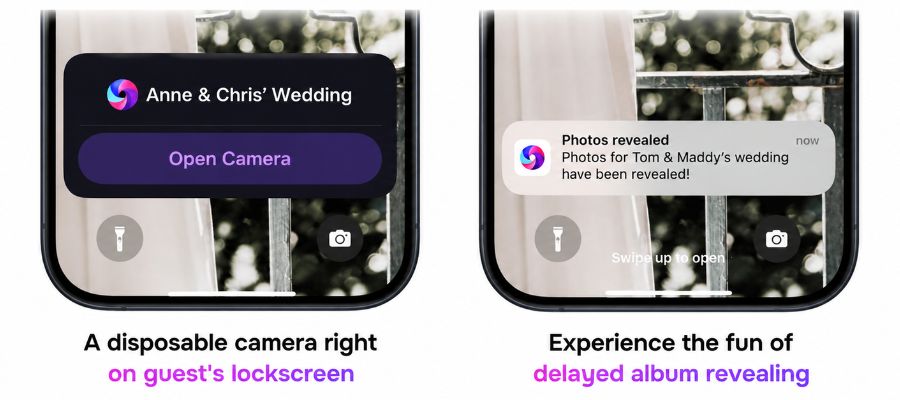
Lense: our top pick for events and larger groups. Guests scan a QR code and add photos without an app or account, on any phone. The different features like the disposable camera, delayed reveal and live photo wall make it part of the event experience. It's paid, while the others are free or have a free plan, but are limited in features.
iCloud Shared Album: a strong free choice for iPhone-heavy groups. Since iOS 27, new albums keep full quality and Android users can add photos in their browser. Everything people add uses the owner's iCloud storage.
Google Photos: a good free choice if your group already uses Google. Familiar and free, but everyone who adds photos needs a Google account.
A note on fairness: Lense is our product. To keep this comparison useful, we judged every option on the same criteria, checked the facts on each provider's own help pages, and say where another option is the better choice.
In-depth comparison
Google Photos
A Google Photos shared album is a free album you share by link or QR code. People in the album can add their own photos, videos and comments (Google Photos Help).
Best for: families and friend groups who already use Google Photos.
Pros
Free, on iPhone and Android
Up to 20,000 photos and videos per album
Comments, and the owner can turn off adding photos
Cons
A Google account is needed to add photos
Anyone with the link can view the album
iCloud Shared Album
An iCloud Shared Album is Apple's free shared album. Since iOS 27, new albums keep photos at full resolution, and friends can join and add photos on the web, even without an Apple device (Apple Support).
Best for: groups where most people have an iPhone.
Pros
Free, and already on every iPhone
Android users can add photos in their browser
Full quality in new albums, plus emoji reactions
Cons
Uses the owner's iCloud storage
Up to 100 people per album
Albums from iOS 26 or earlier are downscaled until upgraded
Lense
Lense is a QR code album built for one moment, like a trip, party or event. Guests scan the code and take photos with the Lense camera or upload from their camera roll. Like a disposable camera, the photos can stay hidden until the reveal. At Lense events, every guest who joins shares 11 photos on average. You pay once per event, from about $5 to $100 (pricing).
Best for: events and larger groups, especially with mixed phones or guests you don't know well.
Pros
No app or account for guests, on iPhone and Android
Original quality, and photos taken offline upload later
Delayed reveal, a live photo wall, likes and comments
The host controls who joins and when the album opens, and can download everything at once
Used by 100,000+ hosts, rated 4.9 from 3,500+ reviews
Cons
Paid for larger groups, although you can test it before paying
Albums are stored for 12 months
Photo limit per guest, unless you upgrade to unlimited
WeTransfer Albums
WeTransfer Albums lets you collect photos through a link or QR code, with an expiry date you choose. Photos are stored without compression, and anyone can view the album in their browser (WeTransfer).
Best for: groups that care about full-resolution files and already use WeTransfer.
Pros
Full quality, no compression
Viewing needs no account or app
Cons
A WeTransfer account is needed to upload
No invite-only setting for uploads
Album limits aren't clearly stated
Side-by-side comparison
Google Photos | iCloud | Lense | WeTransfer | |
|---|---|---|---|---|
No app or account to add | ✗ | ✓ | ✓ | ✗ |
iPhone and Android | ✓ | ✓ | ✓ | ✓ |
Full quality | Varies | ✓ new albums | ✓ | ✓ |
Group sees the album | ✓ | ✓ | ✓ | ✓ |
Organizer control | Basic | Basic | Extensive | Limited |
Fun extras | Comments | Reactions | Reveal, live wall | – |
Cost | Free | Free | $5–$100 once | See plans |
Conclusion: what is the best way to collect photos from a group?
Best overall: Lense. The easiest way to get everyone's photos from a party, group trip or event. Guests scan a QR code and add photos without an app or account, on any phone, and the reveal and live photo wall make sharing photos part of the fun.
Best free option: iCloud Shared Album. Since iOS 27, new albums keep full quality and Android users can join in their browser.
How to collect photos from a group after the event
Is the trip or party already over? Every option above still works, because people upload from their camera roll. What makes the difference is how you ask:
Send the link within a day. The photos are still top of mind and easy to find.
Ask for something specific. "Add your 10 best photos" works better than "send me your pictures".
Give a deadline. "Before Sunday" works better than "whenever you have time".
Send one reminder. A short nudge a few days later catches the people who forgot.
Planning a trip, party or event?
Create your Lense album and test it before you pay.
Frequently asked questions
What is the easiest way to collect photos from a group?
One link or QR code that everyone can use without an app or account. People add photos straight from their phone, so nobody has to send them one by one. With a QR code album like Lense, guests scan the code during the event and their photos go straight into the album.
What is the best free way to collect photos from a group?
A shared album in iCloud or Google Photos. Choose iCloud (iOS 27) if most people have an iPhone, and Google Photos if your group already has Google accounts.
Can I collect photos from a group without an app?
Yes. A new iCloud Shared Album and QR code albums like Lense let people add photos from their browser, without an app or account. WeTransfer Albums also work in the browser, but uploaders need an account.
How do I collect photos from iPhone and Android users in one place?
Most built-in options were made for one platform. AirDrop only works between Apple devices, and older iCloud Shared Albums let Android users look but not add photos. What works on both: a QR code album like Lense, which runs in the browser on any phone, or a new iCloud Shared Album created on iOS 27, where Android users add photos through the web link. Google Photos also works on both, but only if everyone has a Google account.
What is the best way to collect photos from a large group?
The fewer steps, the more photos. A QR code that people scan on the spot, without an account or app, gets the most people to upload. Lense adds a camera experience that gets guests taking pictures all day.